There are several reasons your learner profile may have been suspended. The most common reason is that your learner profile has been inactive for a long period of time. If your learner profile has been suspended, all your learning history is stored in the LMS. Your learning history is not deleted and can be retrieved at any time. Please do not create a new learner profile. This document will provide you with information regarding what you need to do to reactivate your learner profile in the NHHI LMS.
How to reactivate a profile if you know the password for your profile
- Go to: National Hand Hygiene Initiative (NHHI) Learning Management System (LMS) and click the Login button
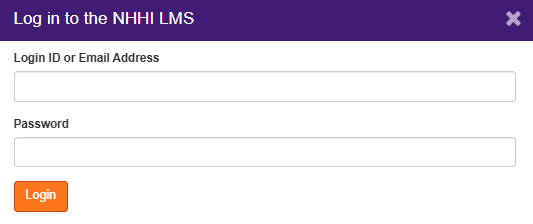
Enter your login ID OR registered email address and password. Click Login:
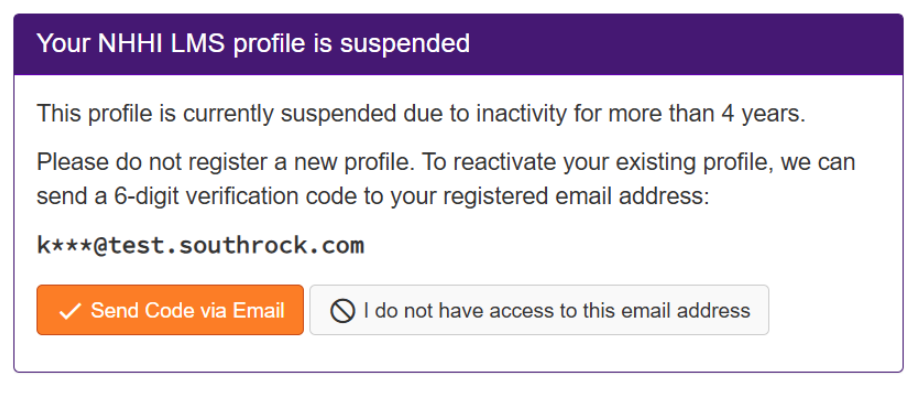
If you enter the correct login ID or email address and password, the following screen will appear. Please click Send Code via Email to send an authentication code to the registered email address for your profile:
Confirmation that a 6-digit security code has been sent to the registered email address will appear. An email with the subject ‘NHHI LMS Verification Code to reactivate account’ will be sent to your registered email address. Check the junk or spam folders of your email account if you are unable to find this email in your inbox.
NOTE: You have 10 minutes to enter the code before it expires. If the code expires, you must request a new one. If you no longer have access to the registered email address, please contact the NHHI Help Desk.
How to reactivate a profile if you do not know the password for your profile
- Go to: National Hand Hygiene Initiative Learning Management System
- Select ‘Email Address’ or ‘Login ID’ from the drop-down menu and enter the details.
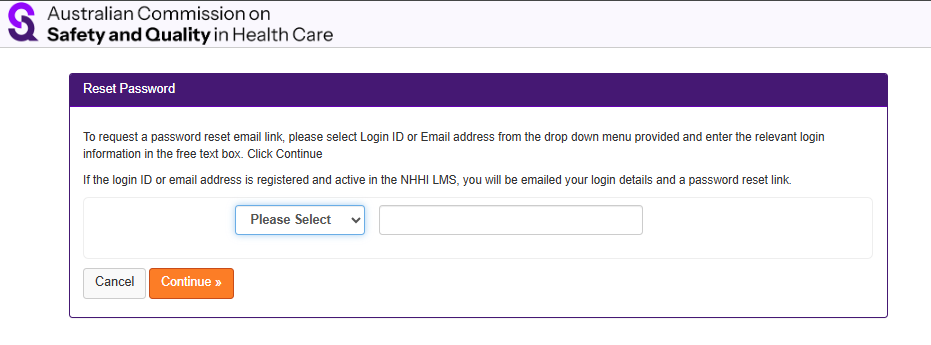
If you enter the correct details, a password reset email will be sent to the registered email address. You may need to check your junk or spam folders for this email.
Follow the prompts in the password reset email. The password reset process will automatically reactivate your profile.
Still need help?
Contact the NHHI Help Desk. To verify your identity, please provide the following:
- List of emails that may have been used (including past and current personal, work or student emails, even if you no longer have access to these)
- Organisation names (including past and current health organisations you have worked for and/or educational institutions where you have studied e.g. TAFE, university)
- Employee/student number (include past and current employer/ learning institution numbers)
- AHPRA number (if applicable)
- Any alternative personal names OR spellings.
Was this article helpful?
That’s Great!
Thank you for your feedback
Sorry! We couldn't be helpful
Thank you for your feedback
Feedback sent
We appreciate your effort and will try to fix the article