Why do I have duplicate profiles?
You might have duplicate profiles if:
- You created a new learner profile when you changed organisations or used a different email address
- Your organisation created a new profile for you, and you created a profile too.
If you have multiple profiles, your profiles need to be merged so that your training history can be located in a single profile.
How do I merge my profiles?
Go to: National Hand Hygiene Initiative (NHHI) Learning Management System (LMS) and click the Login button
Enter your login ID OR registered email address and password. Click Login.
When you successfully log into your profile and the system detects that you have a duplicate profile, you will see a pop-up message on your screen. If you recognise the Login ID or the email address linked to the duplicate profile, then choose Merge this profile. If you do not recognise the Login ID, choose This is not my profile which will close the pop up.
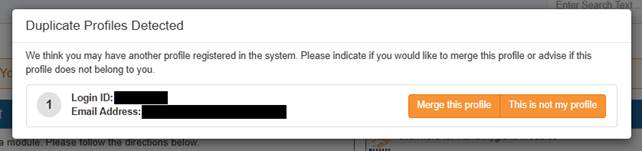
If you choose Merge this profile a prompt screen will appear and provide you with three options:
- If you know the password to the other profile, use Option 1. Enter the password and choose Submit to merge the profiles. If correct, the profiles will be merged automatically.
- If you do not know the password for Option 1 but still have access to the registered email address for the duplicate profile, choose Option 2.
- If you do not know the password and do not have access to the email address registered to the duplicate profile, choose Option 3 by clicking Go to Help Desk. This will take you to the contact us form for the NHHI.
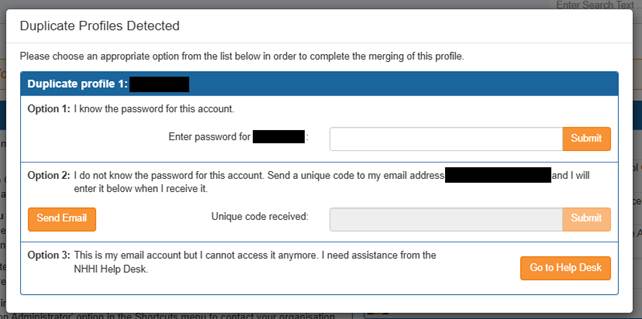
If you choose Option 2 click the Send Email button and you will receive an email like this:
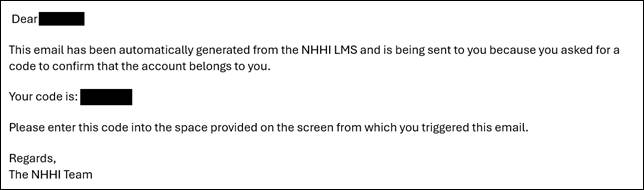
The unique code box will no longer be greyed out. Type in the code from the email that was sent to you and click Submit.

A new page will load, and a pop-up screen will appear to confirm the merge. Your profiles are now merged.
Still need help?
Contact your Organisation Administrator or the NHHI Help Desk. To verify your identity, please provide the following:
- List of emails that may have been used (including past and current personal, work or student emails, even if you no longer have access to these)
- Organisation names (including past and current health organisations you have worked for and/or educational institutions where you have studied e.g TAFE, university)
- Employee/student number (include past and current employer/ learning institution numbers)
- AHPRA number (if applicable)
- Any alternative personal names OR spellings.
Was this article helpful?
That’s Great!
Thank you for your feedback
Sorry! We couldn't be helpful
Thank you for your feedback
Feedback sent
We appreciate your effort and will try to fix the article