As a region administrator, you have access to the training records for all staff linked to organisations within your region group in the NHHI Learning Management System (LMS). You can access a staff member’s completion certificates following these steps:
- Log into the NHHI LMS at https://nhhi.southrock.com
- Open the ‘Organisation’ menu item in the left hand side menu
- Select ‘Learners’
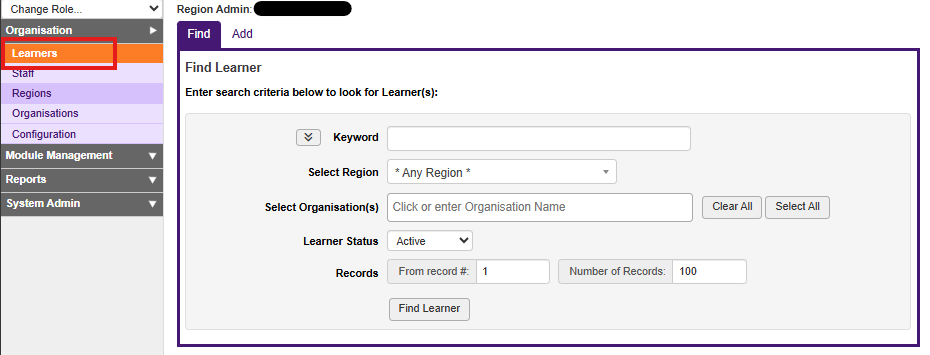
- Enter the staff member’s full name, login ID or email address in the keyword search field
- Click the ‘Find Learner’ button. The staff member’s name will appear in the list below if registered within your region.
- Select the staff member’s name form the name column
- In the new left hand side menu that appears, select ‘Achievements’
- Four icons will appear on screen. Select the ‘Certificates’ icon
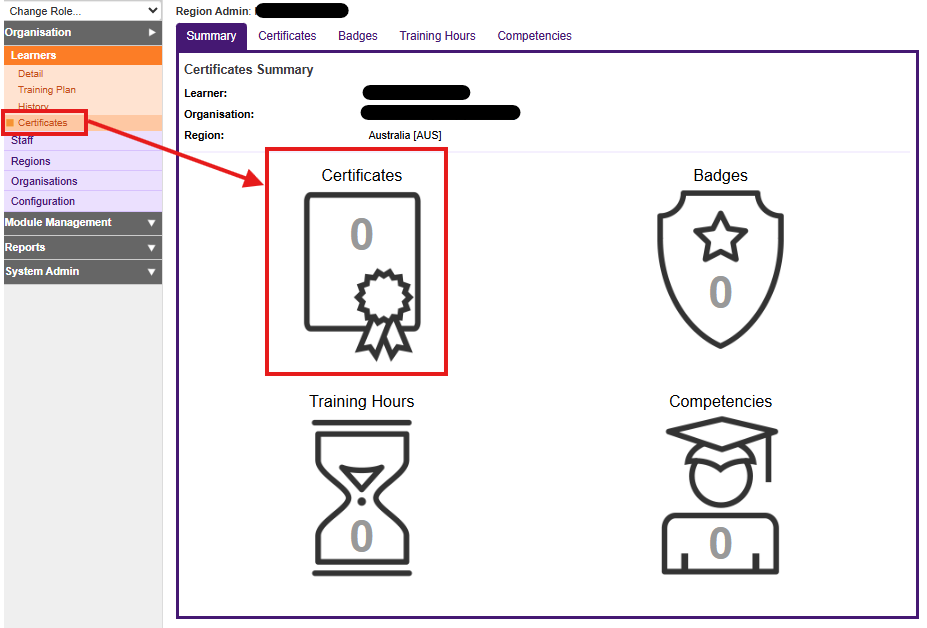
- A list of current certificates will appear on screen. Select the certificate you are looking for by clicking on the ‘eye’ icon in the ‘Action’ column to view the certificate
The certificate will open in a new window. You can download and save or print this certificate.
Was this article helpful?
That’s Great!
Thank you for your feedback
Sorry! We couldn't be helpful
Thank you for your feedback
Feedback sent
We appreciate your effort and will try to fix the article