In the new Infection prevention and control modules, you can check your quiz answers before submitting them without having to start the module again or opening the module in a separate screen.
Learners should check quiz answers before submitting them. To do this, click the relevant section in the navigation menu on the left-hand side of your screen. You can expand the menu by clicking the navigation icon  at the top of the left-hand menu.
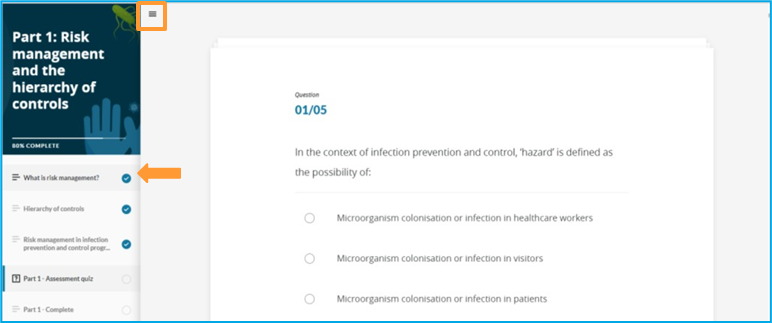
1. Scroll down and find the relevant information for the question
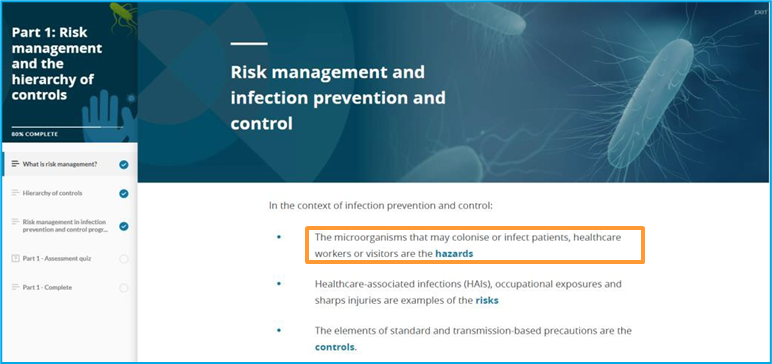
2. Click on the assessment quiz to return to the question
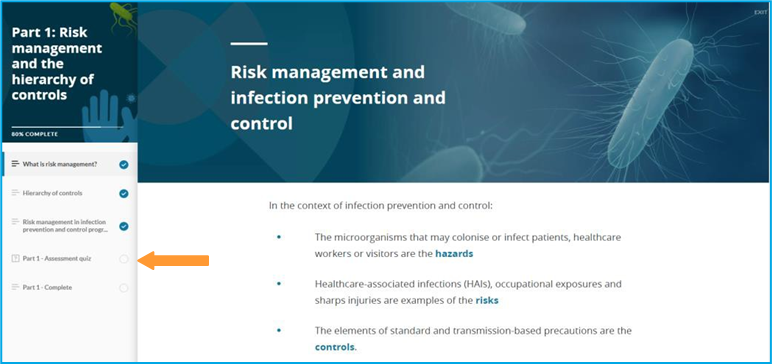
3. Review and submit your answer(s)
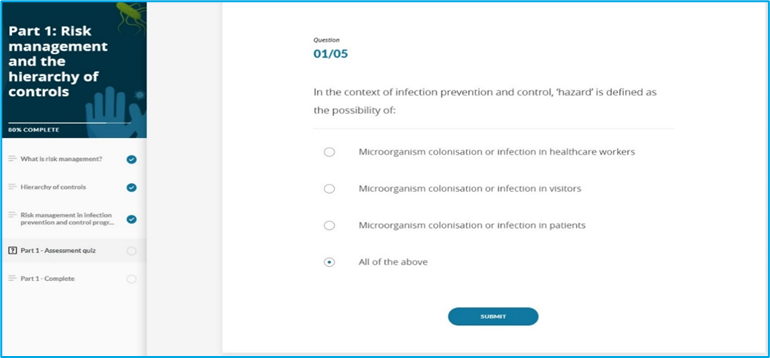
For information on how to review hand hygiene auditor assessment quiz answers, please contact your Hand Hygiene Auditor Educator.
Please refer to below guide on how to check your quiz answers.
Still need help?
Contact your Organisation Administrator or the NHHI Help Desk. To verify your identity, please provide the following:
- List of emails that may have been used (including past and current personal, work or student emails, even if you no longer have access to these)
- Organisation names (including past and current health organisations you have worked for and/or educational institutions where you have studied e.g. TAFE, university)
- Employee/student number (include past and current employer/ learning institution numbers)
- AHPRA number (if applicable)
- Any alternative personal names OR spellings.
Was this article helpful?
That’s Great!
Thank you for your feedback
Sorry! We couldn't be helpful
Thank you for your feedback
Feedback sent
We appreciate your effort and will try to fix the article