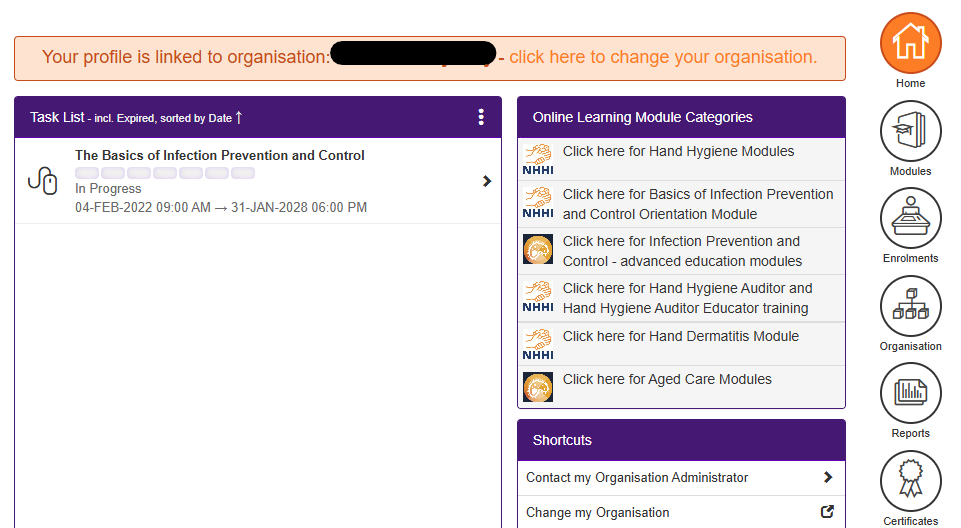
Once you are enrolled in the module, it will be listed in your Task List. When you are ready to continue the module, select the module from your task list:
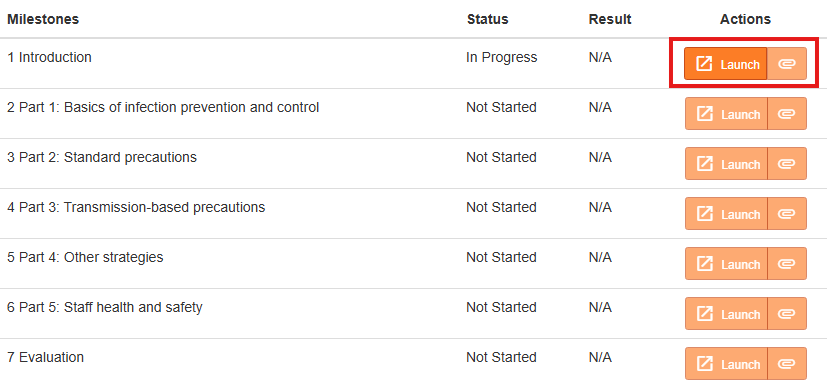
Click the Launch button next to the first In Progress or Not Started milestone:
Tips when working through this module:
- To view more, scroll down the page and click on the blue buttons.
- You are required to complete all activities before you can progress.
- Clicking on hyperlinks will open the webpage in a new tab. This screen will remain open so that you can return to the module.
Please note: The modules will time out after seven hours of inactivity. The module will still appear to be open on your device, and you may even be able to continue to work through it, but your progress will not be recorded in the NHHI LMS after the module has timed out. If you cannot complete the module in one session, you should log out so your progress is not lost.
Was this article helpful?
That’s Great!
Thank you for your feedback
Sorry! We couldn't be helpful
Thank you for your feedback
Feedback sent
We appreciate your effort and will try to fix the article